Realistic Couple Heart Hand Pose AI Photo Prompt with Lockscreen UI
Generate a stunning, romantic golden hour couple portrait on a windswept beach with this ready-to-use master prompt for natural cinematic photography.
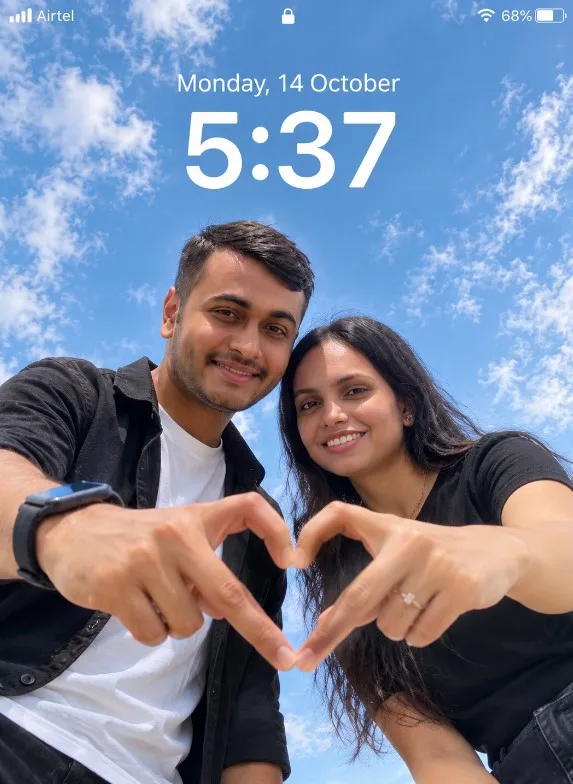 IMAGE PREVIEW
How to use this prompt
- Choose a clear reference image.Use a photo you own or have permission to edit; a sharp, well-lit image usually gives the model more useful detail.
- Copy the master prompt.Paste it into your image tool and upload the reference image if the prompt calls for one.
- Generate, review and refine.Change one detail at a time—such as lighting, background or crop—so you can tell what improved the result.
- Check before publishing.Review faces, hands, text, logos and artifacts, and make sure you have rights to the source image.
Copy-ready AI prompt
Copy the prompt below, then customize the subject, color palette, camera framing or setting to match your project.
Create an ultra-realistic cinematic low-angle couple portrait with a smartphone lockscreen UI overlay. Capture in 8K DSLR quality with extremely sharp focus, zero blur, no artificial smoothing, no CGI or cartoon look. Maintain hyper-realistic skin texture, detailed fabric, and crisp environment clarity. ASPECT RATIO 3:4 vertical SCENE Open outdoor environment with a clean, minimal sky background. Soft light blue sky with subtle natural clouds filling the entire frame. No buildings, no objects, no distractions. SUBJECT A couple leaning toward the camera from above, captured in a low-angle perspective, creating a modern selfie-style composition. Framing must clearly show both faces and hands. FACE & IDENTITY RULES (IMPORTANT) Faces must remain fully natural and identity-preserved. Do NOT beautify, reshape, or over-smooth skin. Maintain natural imperfections (pores, texture, subtle asymmetry). Works for any couple. POSE (STRICT) Both subjects leaning slightly forward toward the camera Heads tilted slightly inward, close to each other Each subject one hand extended downward toward camera Fingers forming a clear heart shape in the centre frame (thumbs + fingers touching) Direct eye contact with camera EXPRESSION Soft natural happy smiles (IMPORTANT) Natural, warm, romantic, friendly vibe No exaggerated expressions OUTFIT (IMPORTANT) Female: simple, minimal black t-shirt (soft fabric, natural drape) Male: white inner t-shirt with black casual shirt (natural folds), optional smartwatch Clothing must look real with visible texture and folds LIGHTING Natural daylight from front-top direction Soft, even illumination on both faces No harsh shadows Natural highlights on skin (cheeks, forehead) Balanced exposure with realistic tones BACKGROUND Full sky visible (light blue + soft clouds) Clean minimal composition No distractions CAMERA & COMPOSITION (STRICT) Low-angle shot (camera placed below, pointing upward) Close-up framing (faces + hands clearly visible) 50mm realistic lens perspective Heart shape perfectly centered Ultra-sharp focus on faces, hands, and sky NO blur anywhere STYLE Hyper-realistic outdoor couple photography Modern, clean, social media aesthetic Natural color grading (no overprocessing) LOCKSCREEN UI OVERLAY Top center: “Sunday, 19 April” (minimal iOS-style font) Below: large bold time “19:04” Top left: signal icon + “Verizon” Top right: battery icon (47%) Clean, subtle smartphone lockscreen overlay NEGATIVE PROMPT blur, motion blur, depth of field, soft focus, background blur, CGI look, cartoon style, plastic skin, distorted hands, extra fingers, extra hands, wrong heart shape pose, bad anatomy, identity change, watermark, low resolution me tuje promt send karta hu tuje image banani hai OK es hisab se lekin time and date ye sab change baki title dena OK
Tips for a better result
- 01Use a clear reference image.
- 02Try multiple variations.
- 03Review the final image before publishing.
Suggested settings
These are starting recommendations, not fixed requirements. Use the aspect ratio and controls available in your chosen AI tool.
Frequently asked questions
Can I use this prompt with Gemini?
Yes, you can try it in Gemini or another compatible image-generation tool. Interface options and results can vary by product and account.
Why does my result look different?
Reference images, model versions, aspect-ratio controls and random variation can all affect the output. Refine the prompt in small steps.
Can I use the generated image commercially?
Check the terms of your chosen AI service and the rights for any uploaded reference image, brand marks or third-party material before commercial use.
Creator tip: If your image generator struggles with lettering, generate the artwork without text and add accurate typography afterward in your design editor. Example images on this page should be replaced with your own final outputs before treating them as tested results.