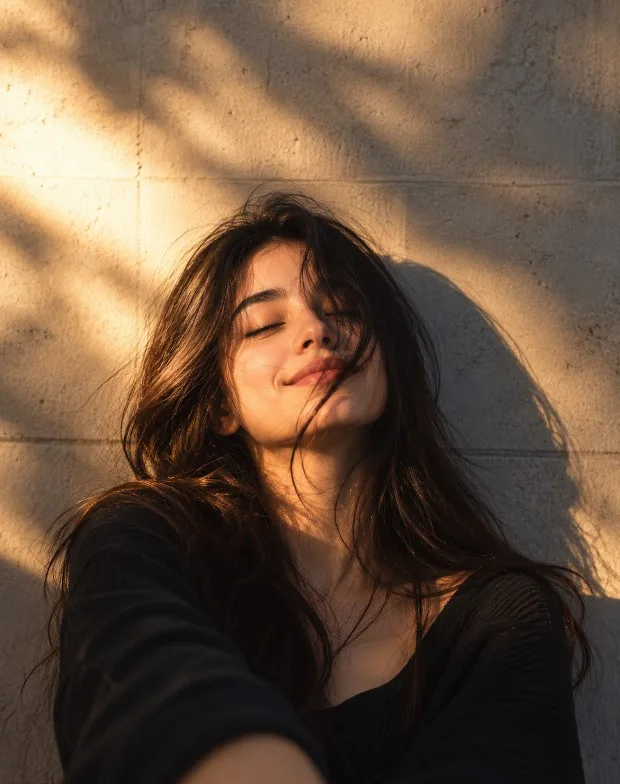
About the Golden Hour Bench Portrait
The core of this candid portrait relies on the natural environment's interaction with daylight. By prompting the camera to gaze toward a subject leaning back with closed eyes, we signal to the generation engine a mood of unforced, quiet reflection.
What elevates the visual aesthetic from a simple snapshot is the dappled light. Sunbeams filtered by overhead foliage paint organic, irregular shadows over the subject's face, hair, and textured canvas outerwear. The inclusion of a highly textured, historic stone wall with overgrown ivy grounds the scene, while the soft background blur (bokeh) keeps your eyes drawn to the subject’s peaceful expression.
How to Use This Prompt
For the most immersive results, explore these staging and camera properties:
Copy the Master Prompt: Set the groundwork by utilizing the detailed environment and lighting features.
Lean on Incomplete and Obstructed Light: Highlighting details like "dappled sunlight filtering through" and "overhead tree leaves" forces the AI to create natural shadows instead of flat, even lighting.
Capture Natural Rest: Incorporate casual, slow-paced descriptors like "leaning back slightly" and "eyes closed" to discourage the AI from creating the usual, posed camera-facing smile.
Customization Tips for Creative Variations
Adapt this natural snapshot for varied stories and seasons using these easy tweaks:
Incorporate Seasonal Wardrobe: Swap his casual canvas jacket for "a heavy knit mustard-colored sweater and scarf for late autumn" or "a light denim jacket and sunglasses resting on the bench."
Add Personal Activities: Transition his resting state into an active one by adding details such as "holding an open paper journal with a pen resting in his fingers" or "listening with wires from old-school headphones visible."
Adjust Environmental Density: Try adding more natural depth with details like "distant blurred pedestrians strolling" or "golden leaves scattered along the pathway."
Explore a Golden Age Lens: Introduce an older protagonist by specifying "a thoughtful man in his early 60s with silver-flecked hair" to introduce rich, natural character lines.
What this prompt helps you create
Capture unposed natural light with this cinematic outdoor portrait of a man on a park bench, designed to create candid golden hour photography. This prompt gives you a structured starting point for subject, composition, lighting, styling and image quality. Use it as a guide rather than a guarantee: results vary with the reference image, generator and settings.
How to use this prompt
- Choose a clear reference image.Use a photo you own or have permission to edit; a sharp, well-lit image usually gives the model more useful detail.
- Copy the master prompt.Paste it into your image tool and upload the reference image if the prompt calls for one.
- Generate, review and refine.Change one detail at a time—such as lighting, background or crop—so you can tell what improved the result.
- Check before publishing.Review faces, hands, text, logos and artifacts, and make sure you have rights to the source image.
Copy-ready AI prompt
Copy the prompt below, then customize the subject, color palette, camera framing or setting to match your project.
Transform the uploaded photo into a dreamy, cinematic golden-hour portrait. Preserve the original person's identity, facial features, skin tone, and natural proportions. Create warm amber sunlight falling diagonally across the face and a textured beige concrete wall, with deep, soft-edged shadows adding dramatic depth. Give the portrait a relaxed, candid feeling, with naturally tousled hair gently falling across the face and a subtle, peaceful expression. Use warm golden highlights, muted earthy tones, realistic skin texture, delicate film grain, soft background detail, and professional editorial photography lighting. Maintain the original person's recognizable appearance and adapt the effect to their existing pose. Photorealistic, intimate, natural, high-quality portrait. No text, logos, watermarks, borders, or graphic overlays.
Tips for a better result
- 01Use a clear reference image.
- 02Try multiple variations.
- 03Review the final image before publishing.
Suggested settings
These are starting recommendations, not fixed requirements. Use the aspect ratio and controls available in your chosen AI tool.
Frequently asked questions
Can I use this prompt with Gemini?
Yes, you can try it in Gemini or another compatible image-generation tool. Interface options and results can vary by product and account.
Why does my result look different?
Reference images, model versions, aspect-ratio controls and random variation can all affect the output. Refine the prompt in small steps.
Can I use the generated image commercially?
Check the terms of your chosen AI service and the rights for any uploaded reference image, brand marks or third-party material before commercial use.
Creator tip: If your image generator struggles with lettering, generate the artwork without text and add accurate typography afterward in your design editor. Example images on this page should be replaced with your own final outputs before treating them as tested results.