Cinematic Black and White Street Portrait AI Prompt
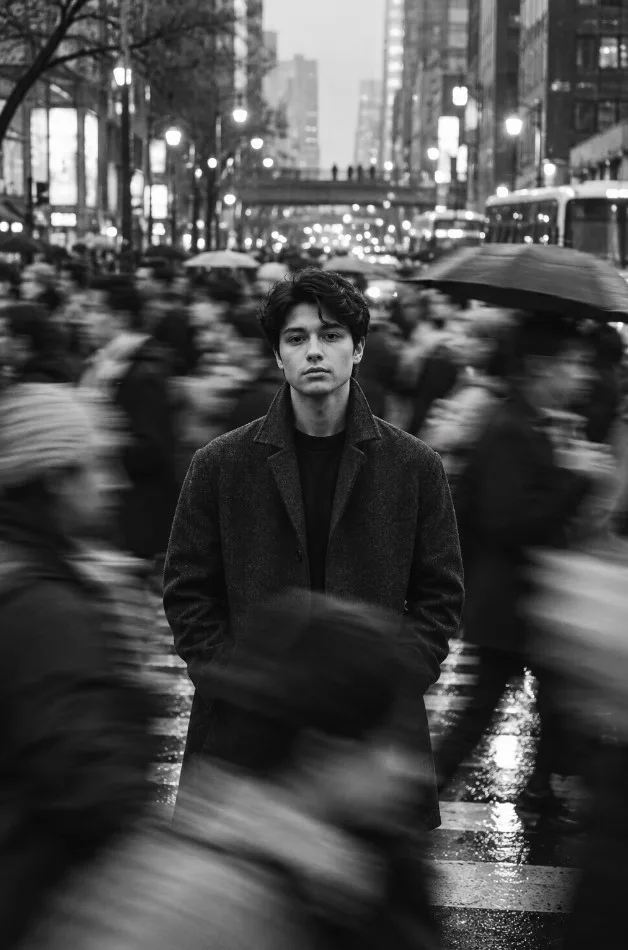
Create striking urban photography with this cinematic AI portrait prompt. The concept combines a sharply focused subject with a moving crowd, rainy city streets, and classic monochrome tones.
Copy the AI Prompt
Use the copy-ready master prompt above with your preferred AI image generator. For the best results, keep the main subject in sharp focus and let the surrounding pedestrians create natural directional motion blur.
How to Get Better Results
• **Lighting:** Use soft city lights, deep shadows, and realistic reflections.
• **Composition:** Place the subject near the center of the frame.
• **Motion:** Blur the surrounding crowd while keeping the face sharp.
• **Style:** Use realistic black and white tones with subtle film grain.
• **Aspect ratio:** Try a 4:5 vertical portrait.
Customization Ideas
Experiment with different coats, rainy streets, subway entrances, crowded markets, or evening crosswalks to create your own original variation.
Final Tip
Adjust the lighting, environment, clothing, and camera perspective to achieve a distinctive result. AI-generated images may vary depending on the model and settings used.
What this prompt helps you create
Create a dramatic black and white street portrait using AI. This cinematic photography prompt captures a sharply focused subject surrounded by motion-blurred commuters an This prompt gives you a structured starting point for subject, composition, lighting, styling and image quality. Use it as a guide rather than a guarantee: results vary with the reference image, generator and settings.
How to use this prompt
- Choose a clear reference image.Use a photo you own or have permission to edit; a sharp, well-lit image usually gives the model more useful detail.
- Copy the master prompt.Paste it into your image tool and upload the reference image if the prompt calls for one.
- Generate, review and refine.Change one detail at a time—such as lighting, background or crop—so you can tell what improved the result.
- Check before publishing.Review faces, hands, text, logos and artifacts, and make sure you have rights to the source image.
Copy-ready AI prompt
Copy the prompt below, then customize the subject, color palette, camera framing or setting to match your project.
Create a photorealistic black-and-white cinematic street portrait of a young adult man standing perfectly still in the middle of a busy, rain-soaked city crosswalk at dusk. He wears a textured charcoal wool overcoat over a simple black shirt, with both hands resting naturally in his pockets. His expression is calm, introspective, and serious, with natural facial features and sharp eyes. Surround him with commuters carrying umbrellas, captured in sweeping directional motion blur while his face and body remain clearly focused. Wet pavement reflects soft streetlights, distant buildings dissolve into atmospheric bokeh, and subtle film grain adds an authentic analog photography aesthetic. Use dramatic monochrome tonal contrast, soft diffused highlights, deep natural shadows, realistic skin texture, a 50mm street photography lens, shallow depth of field, and a vertically balanced editorial composition. High-end documentary photography, natural proportions, crisp subject detail, realistic lighting, 4:5 vertical framing. No text, no logos, no watermark, no borders.
Tips for a better result
- 01Use a clear reference image.
- 02Try multiple variations.
- 03Review the final image before publishing.
Suggested settings
These are starting recommendations, not fixed requirements. Use the aspect ratio and controls available in your chosen AI tool.
Frequently asked questions
Can I use this prompt with Gemini?
Yes, you can try it in Gemini or another compatible image-generation tool. Interface options and results can vary by product and account.
Why does my result look different?
Reference images, model versions, aspect-ratio controls and random variation can all affect the output. Refine the prompt in small steps.
Can I use the generated image commercially?
Check the terms of your chosen AI service and the rights for any uploaded reference image, brand marks or third-party material before commercial use.
Creator tip: If your image generator struggles with lettering, generate the artwork without text and add accurate typography afterward in your design editor. Example images on this page should be replaced with your own final outputs before treating them as tested results.