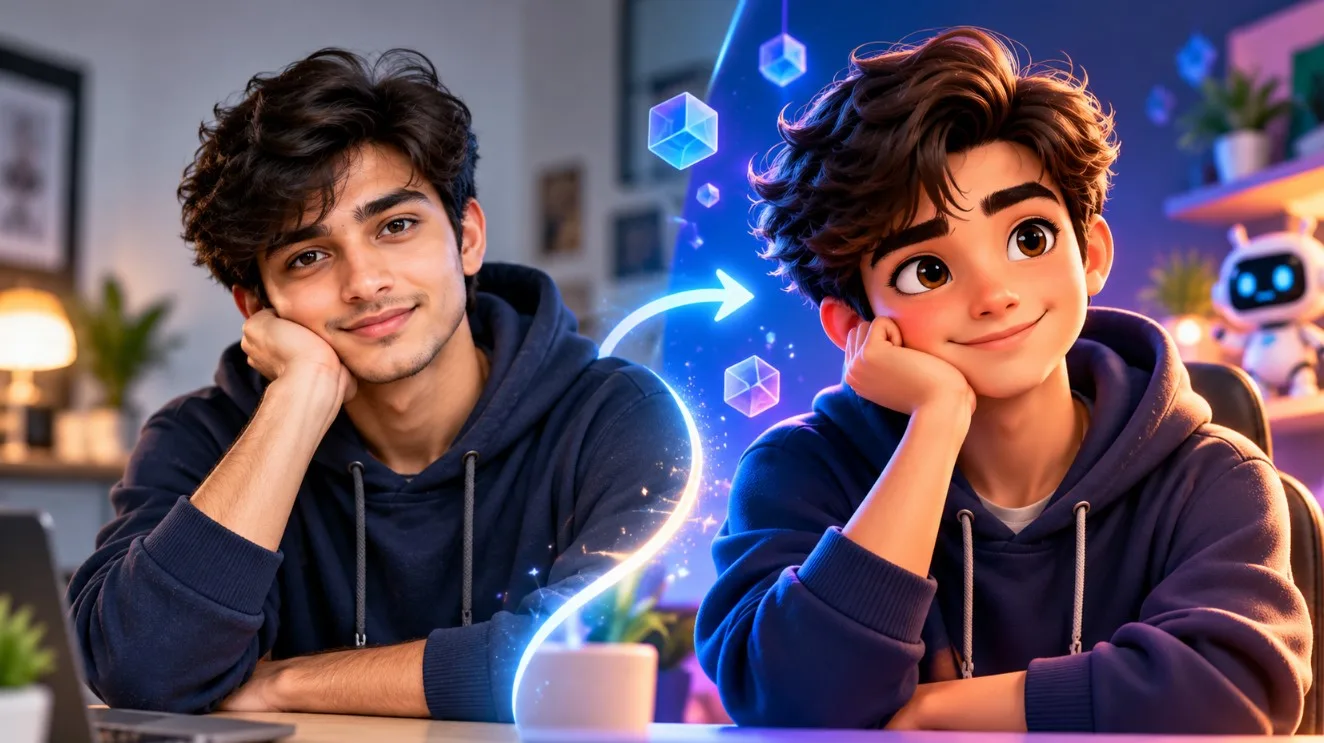
Reality Meets Imagination: Turn Your Photo into a 3D Character with AI
What if you could transform an ordinary photograph into a colorful 3D character while keeping the personality and recognizable features of the original subject?
AI image-generation tools make it possible to explore creative transformations, from cute cartoon avatars to polished 3D animation-inspired portraits. With ChatGPT, you can develop a detailed prompt that describes the character's appearance, clothing, expression, lighting, and background before generating the image.
In this guide, you will learn how to turn a photo into a 3D AI character, discover copy-ready prompts, and customize the results to match your imagination.
What Does Reality Meets Imagination Mean?
Reality meets imagination is a creative approach that combines a real photograph with an imaginative visual interpretation.
For example, an ordinary portrait can inspire a stylized 3D character with expressive eyes, smooth materials, detailed clothing, and cinematic lighting. The original image provides a visual reference, while the AI-generated version introduces a new artistic style.
You can experiment with different transformations, including:
• Real portraits into 3D cartoon characters.
• Personal photographs into stylized avatars.
• Everyday outfits into cinematic character designs.
• Pet photographs into cute 3D mascots.
• Original character concepts into polished digital artwork.
The goal is to create an imaginative interpretation rather than simply apply a generic filter.
How to Create a 3D AI Character Using ChatGPT
### Step 1: Choose a clear reference photo
Start with a photograph that clearly shows the subject's face, clothing, and pose. Good lighting and an unobstructed view can make it easier for an image generator to interpret the important details.
Use a photo you own or have permission to edit.
### Step 2: Ask ChatGPT to create the prompt
Upload your reference photo if image input is available, then ask ChatGPT to write a prompt for a stylized 3D transformation.
Explain which details should remain recognizable and which elements can change.
### Step 3: Choose your 3D style
Decide whether you want a cute cartoon look, a polished animation-inspired render, a collectible toy aesthetic, or a cinematic fantasy character.
A consistent visual direction generally works better than mixing several unrelated styles.
### Step 4: Generate the image
Copy your finished prompt into an image generator that supports reference-image editing. Depending on the tool, you may also be able to generate or edit the image directly in ChatGPT.
### Step 5: Review and improve the result
Check the face, hairstyle, clothing, hands, proportions, and background. If something looks incorrect, request a targeted edit rather than changing the entire prompt.
Reference-based generation can help preserve visual details, but exact identity preservation is not guaranteed.
Prompt 1: Real Photo to Cute 3D Character
Use this prompt to transform a portrait into a friendly, stylized 3D character.
**Prompt:**
Use the uploaded photograph as a visual reference and transform the person into an original, polished 3D cartoon character. Preserve their recognizable facial features, hairstyle, clothing colors, and general pose as closely as possible. Give the character expressive eyes, carefully sculpted facial features, realistic fabric textures, smooth three-dimensional materials, and a warm, natural smile. Use soft cinematic studio lighting, subtle contact shadows, and a clean blue-and-purple background with gentle highlights. Create a high-quality 3D animation-inspired render with a clear silhouette and balanced composition. Avoid excessive facial changes, distorted hands, unnecessary accessories, and cluttered backgrounds.
Prompt 2: Reality Meets Fantasy Character
Use this prompt for a more imaginative transformation.
**Prompt:**
Transform the uploaded reference photograph into a creative cinematic 3D character while keeping the subject's recognizable appearance and essential clothing details as consistent as the tool allows. Introduce a subtle fantasy atmosphere with glowing geometric elements, floating particles, soft blue and violet light, and a beautifully detailed three-dimensional environment. Use realistic material shading, expressive facial details, natural proportions, carefully controlled highlights, and cinematic depth. Keep the character as the main focal point and make the transition between the original visual identity and the imaginative world feel cohesive. Avoid copying existing copyrighted characters or adding random text and logos.
Prompt 3: Premium 3D Avatar
**Prompt:**
Create a premium stylized 3D avatar based on the uploaded reference photograph. Preserve the person's recognizable features, hairstyle, and outfit as closely as possible. Use carefully sculpted forms, detailed fabric, subtle skin shading, expressive eyes, and professional studio lighting. Place the character against a minimal gradient background with a soft floor shadow. Create a clean, polished avatar suitable for a creative portfolio or profile image. Maintain balanced proportions and avoid excessive smoothing or exaggerated facial changes.
How to Get Better Results
### Keep the prompt specific
Describe the subject, the intended style, the lighting, and the details that matter most. Avoid adding unnecessary instructions that compete with the main idea.
### Preserve important features
If you want the character to resemble the original photograph, explicitly mention the features and clothing that should remain consistent. Review the output carefully because image generators may alter them.
### Experiment with backgrounds
Try a clean studio background for a professional avatar or a glowing futuristic environment for a fantasy-inspired result.
### Refine one detail at a time
If the character looks good but the background is distracting, change the background first. If the clothing changes unexpectedly, request a correction to the clothing while preserving the rest of the image.
Common Mistakes to Avoid
• Using a blurry or poorly lit reference photograph.
• Giving conflicting instructions about realistic and cartoon styles.
• Changing the face, outfit, pose, and environment all at once.
• Expecting a generated image to be an editable 3D model.
• Publishing an image without checking for visual inconsistencies.
Frequently Asked Questions
### Can ChatGPT turn a photo into a 3D character?
ChatGPT can help create detailed prompts and, depending on the available image features, generate or edit images. The result is typically a rendered image rather than an editable 3D model.
### Can I use these prompts with Gemini?
Yes. You can adapt these prompts for Gemini and other image-generation tools that support the relevant image-input or editing features.
### How do I keep the same face in a 3D transformation?
Use a clear reference image and specify which facial features should remain recognizable. Results vary, and exact identity preservation is not guaranteed.
### Can I use a 3D AI character commercially?
Check the image generator's terms, the rights to your reference photograph, and any applicable restrictions before using the output commercially.
Final Thoughts
Turning a real photograph into a 3D AI character is a creative way to explore the boundary between reality and imagination. ChatGPT can help you develop the instructions, while a compatible image generator creates the visual result.
Start with a clear reference photo, choose a consistent visual style, and refine the prompt until the result matches your creative direction.
Explore more 3D character prompts, AI photo-editing ideas, and creative tutorials on Promptzyra.